
English 


Author: Site Editor Publish Time: 2026-10-08 Origin: Site


Many practices still rely on legacy film or phosphor plates for their daily diagnostics. They face a pressing clinical reality. These clinics need a reliable bridge to modern digital workflows without sacrificing image clarity. Managing physical films slows down patient turnover and complicates archiving. A poor quality dental x ray film reader creates severe diagnostic bottlenecks. It compromises patient records and disrupts chairside efficiency.
We understand this transition requires careful planning and the right technology stack. Practice owners and IT integrators face a crowded market filled with confusing specifications. We designed this guide to provide a vendor-neutral, technical evaluation framework. You will learn exactly how to select the right scanning hardware. We will help you avoid overpaying for unnecessary features while securing the capabilities your clinicians actually need. By the end of this article, you will have a clear roadmap for upgrading your imaging infrastructure confidently.
Resolution vs. Speed: Diagnostic clarity requires high optical density and DPI, but daily chairside use demands rapid scan times—balance these based on clinic volume.
Software is the Bottleneck: Hardware specs are irrelevant if the reader lacks native DICOM compliance or requires clunky TWAIN bridges to integrate with your existing Practice Management Software (PMS).
Vendor Support Matters: Sourcing from a verified dental film scanner supplier with robust post-sale support and warranty coverage ensures long-term operational reliability.
Compliance is Non-Negotiable: HIPAA (or regional equivalent) and FDA/CE certifications are baseline requirements for any digital imaging hardware.
Start your evaluation by forcing your purchasing team to look at actual clinic workflows. You must prevent over-specifying or under-specifying the equipment. Evaluate how your staff handles physical media every single day.
Contrast the needs of a clinic processing active intraoral films daily against one executing a bulk back-scan. Active daily scanning requires fast, single-feed mechanisms. Dentists need immediate results to discuss treatment plans. A practice conducting bulk back-scans of legacy patient records faces a different challenge. Back-scanning demands robust continuous batch processing capabilities. We recommend assessing your daily volume using these steps:
Audit daily active films: Count how many new films your staff shoots per day.
Calculate archival backlog: Estimate the thousands of legacy patient folders needing digitization.
Determine processing windows: Decide if scanning happens during patient visits or after hours.
Evaluate the footprint and workflow of your physical clinic space. A compact chairside X-ray film reader offers distinct advantages for modern practices. It optimizes the immediate review process for the dentist. You can discuss the results directly while the patient remains in the chair. Conversely, a centralized multi-slot batch scanner works better for dental assistants managing high volumes. They can process multiple patient films simultaneously in a dedicated sterilization room. Choose the model layout matching your clinic floor plan.
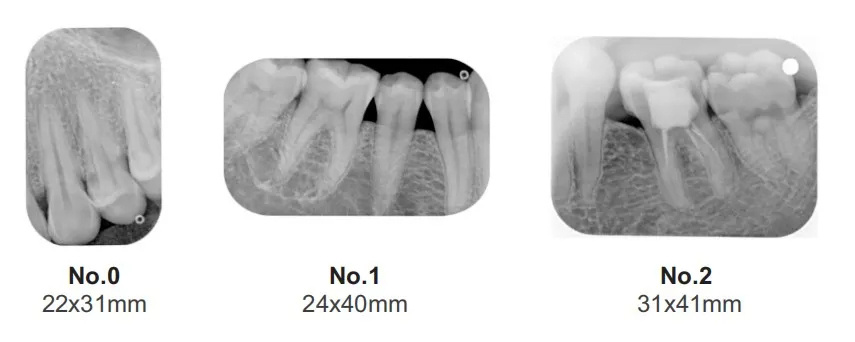
Ensure the hardware supports the specific film sizes you use regularly. Practices handle a wide mix of sizes daily. Pediatric patients require Size 0 films. Standard bitewings use Size 2. Occlusal views require Size 4. Orthodontic cases often rely on panoramic or cephalometric films. Verify the scanner includes physical adapter templates for these formats. Missing adapters lead to crooked scans, jammed rollers, and frustrated staff members.
Common Mistake: Practice owners often buy a scanner based purely on price, only to discover it cannot process Size 4 occlusal films. Always verify the full range of supported media before buying.
You must break down the technical specs determining actual diagnostic confidence. Maintain a skeptical tone regarding "maximum theoretical DPI" on marketing brochures.
Define the minimum true optical resolution required for clinical use. Diagnostic-grade caries detection typically requires at least 14 to 20 line pairs per millimeter (lp/mm). Warn your IT integrators against confusing interpolated resolution with optical resolution. Interpolated resolution uses software algorithms to guess missing pixels. True optical resolution relies purely on the physical hardware sensor. You need genuine hardware clarity to spot early-stage lesions accurately. Bit depth matters equally. A 16-bit grayscale output provides 65,536 distinct shades of gray. This depth delivers superior image richness.
Optical density (Dmax) measures the ability to capture details in the darkest areas of a radiograph. Explain this critical metric to your purchasing team. A high Dmax (typically 3.0 or higher) distinguishes subtle variations in bone density and soft tissue. When you view these digitized images on a dental radiography viewer, low Dmax results in washed-out shadows. You lose diagnostic confidence quickly if you cannot identify subtle pulp chamber margins.
Detail realistic scanning times for your daily operations. Marketing materials often cite "instantaneous" results. In clinical reality, expect 4 to 10 seconds per film. This cycle time heavily impacts the "patient-in-chair" experience. If a full mouth series (FMX) takes ten minutes to scan, patients grow restless. Fast scan speeds reduce appointment times and improve daily clinic revenue by accelerating patient turnover.
Highlight the importance of sealed internal optics. Dental clinics naturally generate airborne dust from aerosols and polishing pastes. Sealed optics provide essential dust resistance. Furthermore, check the roller mechanisms carefully. Rollers inevitably wear out over time. They must be easily replaceable by your in-house staff. If you have to ship the entire unit back for a simple roller change, you suffer unacceptable downtime.
Hardware Specification Benchmarks
Specification Feature | Minimum Requirement | Ideal Requirement | Clinical Workflow Impact |
|---|---|---|---|
Optical Resolution | 14 lp/mm | 20+ lp/mm | Allows detection of early interproximal caries. |
Grayscale (Dmax) | 2.5 Dmax | 3.0+ Dmax | Ensures deep shadows show root structures clearly. |
Scan Cycle Time | 15 seconds/film | 4 - 8 seconds/film | Keeps chairside workflow fast and patients comfortable. |
Bit Depth | 12-bit grayscale | 16-bit grayscale | Provides smoother gradients for bone density analysis. |
Address the highest risk factor in dental IT implementation directly. Software friction destroys staff morale much faster than hardware failure.
Discuss the realities of integrating new hardware into major software ecosystems. Common platforms include Dexis, Eaglesoft, and Romexis. Emphasize native integration over buggy third-party bridging tools. Native integration means the scanner talks directly to your patient database natively. Bridging tools often freeze or drop connections unexpectedly. When a connection drops during processing, you lose the scan data. You then have to rescan the film, wasting valuable clinical time and frustrating the patient.
Explain why the reader must output true DICOM files. DICOM remains the universal language of medical imaging. It ensures absolute interoperability across different software brands. It provides secure archiving protocols. True DICOM output is strictly essential for teleradiology referrals. When you refer a patient to an oral surgeon, they expect standard DICOM files. Proprietary file formats trap your clinical data. They force you to stay locked into one software vendor indefinitely.
Evaluate the bundled software carefully before committing. Ask if it includes reliable automated filters. Look for essential tools like sharpening and noise reduction. However, these tools must never artificially alter diagnostic artifacts. Over-sharpening sometimes creates fake lines resembling root fractures. The software should enhance overall clarity without rewriting the raw clinical data.
Best Practice: Always ask the vendor to perform a live software demo using your specific version of Practice Management Software. Never assume compatibility based on a brochure checkmark.
Shift your focus toward rigorous vendor evaluation. Teach your buying team how to assess the manufacturer or distributor accurately.
Compare buying from a broad catalog distributor versus a specialized X-ray film viewer manufacturer. Broad distributors sell everything from gloves to patient chairs. They rarely employ deep technical experts for niche electronics. A specialized manufacturer focuses entirely on imaging technology. They understand sensor calibration, complex software integrations, and image artifact troubleshooting. Buying direct often yields significantly better post-sale technical support.
Dental service organizations (DSOs) possess unique scaling needs. Outline what these groups should look for in OEM dental diagnostic equipment. DSOs often require white-labeling for brand consistency. They need custom firmware to match their proprietary cloud systems seamlessly. Volume scalability remains crucial. If you open ten new clinics next year, the OEM partner must deliver identical hardware reliably on schedule.
Detail the expected warranty length and exact support terms. Most reputable devices offer one to three years of coverage. Ask your dental imaging equipment supplier about hot-swap replacement policies. A hot-swap policy ships a loaner unit overnight if yours breaks down. This aggressive policy prevents clinical downtime. Furthermore, ensure they offer robust remote IT troubleshooting. Engineers can fix most software glitches via a quick remote desktop session.
Confirm the strict necessity of active regulatory clearances. You must verify FDA 510(k) approval for practices in the United States. Look for active CE marks in European jurisdictions. Verify ISO 13485 certifications for manufacturing quality control. Uncertified hardware exposes your practice to massive legal liability. If you miss a critical diagnosis using unapproved equipment, your malpractice insurance might deny coverage entirely.
Build trust among your stakeholders by transparently discussing the friction points of adopting new hardware. Nothing operates completely plug-and-play in a busy clinical environment.
Address the initial training time required for your team. Dental assistants must master exact feeding techniques quickly. Crooked feeding causes frustrating film jams. Improper handling often causes permanent scratching on the delicate film surface. Schedule at least one hour of dedicated hands-on training per staff member. Let them practice extensively with discarded films before scanning actual patient records.
Discuss optimal physical placement inside the clinic. Some legacy readers require dimmed environments for peak sensor performance. Bright overhead surgical lights can bleed directly into the scanning slot. This unwanted light causes severe image fogging. Place the reader in a shaded corner, a dedicated sterilization area, or a small darkroom space for best results.
Factor the ongoing supplies into your annual clinic budget accurately. You will need several specific items to keep the hardware running smoothly:
Cleaning sheets: Specialized abrasive sheets remove debris and dust from the internal rollers.
Calibration targets: You must run these periodically to keep the optical sensor perfectly accurate.
Hygiene barrier envelopes: These disposable covers protect the machine from cross-contamination between patients.
These ongoing consumables add up over time. Do not ignore them when planning your yearly equipment maintenance budget.
Selecting the right hardware requires a careful balance of technical specs and workflow realities. Prioritize workflow alignment above all else. Choose intelligently between chairside or batch processing designs based strictly on your daily volume. Mandate true DICOM compliance to future-proof your patient data and ensure smooth specialist referrals. Finally, rigorously vet the support terms of the supplier before signing any contracts.
Your next step should involve practical testing. Encourage your IT team to request an in-clinic demo from your shortlisted vendors. Alternatively, send them a sample set of your own legacy digitized films. Compare the resulting image clarity side-by-side on your existing monitors. Testing the equipment in your actual environment prevents costly purchasing mistakes.
A: Dedicated readers possess specific optical density capabilities (Dmax > 3.0). They use transparency units designed specifically for clinical radiograph diagnosis. Standard flatbeds struggle with backlighting small films. They often cause artifact distortion and lack the specialized resolution needed to spot subtle interproximal caries reliably.
A: Yes, you need it if native software integration isn't available. TWAIN allows the scanner to communicate directly with most dental imaging software automatically. This standard prevents the need to export and import files manually. It saves significant chairside time and keeps patient records organized without extra clicks.
A: A commercial scanner typically lasts five to seven years. This lifespan depends heavily on your daily scan volume. It also relies on strict adherence to roller cleaning protocols. Dust, abrasive pastes, and debris cause the most wear and tear on these sensitive optical machines.
A: The hardware itself isn't HIPAA compliant. However, the bundled software must feature encrypted local storage, detailed audit logs, and secure user access controls. These specific software features are necessary to meet strict HIPAA compliance standards for patient data protection and privacy.

