
English 


Author: Site Editor Publish Time: 2026-11-12 Origin: Site


Dental intraoral cameras often fail not because of outdated sensors, but due to basic mechanical wear like frayed cords or chemical degradation like fogged lenses. This happens more frequently than most clinic managers expect. For dental practice owners and clinical directors, unexpected hardware failure translates directly to operatory downtime. It forces sudden workflow disruption and creates immediate, unbudgeted replacement costs. Transitioning to modular imaging equipment shifts practice overhead effectively. Specifically, cameras featuring detachable cables and sealed lenses move expenses from costly full-unit replacements to manageable, low-cost component swaps. You can achieve this financial flexibility while strictly maintaining stringent infection control standards. In this guide, we explore how modular setups eliminate single points of failure entirely. You will learn how to evaluate equipment durability properly and protect your clinical technology budget against preventable hardware losses.
Predictable OPEX: A detachable cable turns a catastrophic hardware failure into a minor, low-cost maintenance event.
Infection Control: Waterproof sealed lenses withstand harsh chemical disinfectants, preventing internal moisture and image fogging over time.
Maximized Uptime: Modular designs allow dental assistants to swap components instantly, keeping operatories functional without waiting on manufacturer RMAs (Return Merchandise Authorizations).
Standard fixed-cord cameras present a massive single point of failure in any busy clinic. Dental equipment experiences incredibly heavy physical abuse during normal daily operations. A hygienist might easily roll over a loose cable with a heavy metallic dental stool while reaching for an instrument. Repeated bending at the cord base happens constantly as users navigate around patients. Over time, these seemingly normal mechanical actions can easily brick a $1,000+ medical device. This physical vulnerability creates immediate, highly frustrating operational friction for everyone involved.
Let us calculate the real downtime metric and its true business impact. Imagine a primary operatory losing its imaging capabilities for three to five days. You must wait for off-site repairs or ship a replacement unit from a distant supplier. During this waiting period, you lose valuable case acceptance opportunities every single hour. You cannot efficiently show patients their cracked amalgams or hidden interproximal decay on the monitor. Without that visual proof, patients often decline necessary restorative treatments. The ultimate financial hit from rejected treatment plans far exceeds the camera's initial sticker price.
Hardware realities dictate our procurement choices today. Fixed connections inherently bear the maximum stress of daily clinical movement. Wires bend, twist, and pull during every single patient exam. When the fragile internal wiring inevitably fractures, the entire unit fails completely. The internal optical sensor and advanced image processing unit become utterly useless immediately. They still function perfectly on a technical level, but the broken wire traps them. You must discard perfectly good optical sensors simply because a cheap copper wire snapped inside the plastic casing.
Modular design brilliantly decouples the fragile connection wire from the expensive optical sensor. This physical separation fundamentally changes how dental clinics manage broken equipment. It shifts the entire burden from catastrophic loss to simple, predictable maintenance. You stop treating advanced medical optics like disposable consumer electronics.
Compare the financial outcomes directly. Purchasing a $20–$50 Replaceable USB Cable makes logical sense for any practice. It completely prevents the need to repurchase a complete clinical camera system when damage occurs. If a rolling chair severs the wire, your dental assistant simply unplugs it. They grab a spare cord from the supply closet immediately. The camera works again perfectly in under thirty seconds. Your patient never even notices the brief interruption.
This approach offers massive scalability and operational control for Dental Service Organizations. For multi-operatory practices, standardizing on a Detachable Cable Intraoral Camera creates immense efficiency. IT teams can confidently stock spare cables in bulk at a central location. This standardization allows rapid deployment and heavily reduces inventory overhead across multiple clinic locations. Clinic managers no longer need to hoard expensive backup cameras in their office drawers just in case one breaks.
We must clearly acknowledge a transparent assumption here regarding physical wear. The connection ports on detachable models do require baseline staff care. Whether they utilize standard USB-C or proprietary locking pins, staff must avoid stripping the internal port. Jerking the cord at sharp angles can damage the connector permanently. However, the statistical failure rate still heavily favors modularity over traditional fixed-wire designs. The data consistently shows detachable models outlast their fixed counterparts significantly.
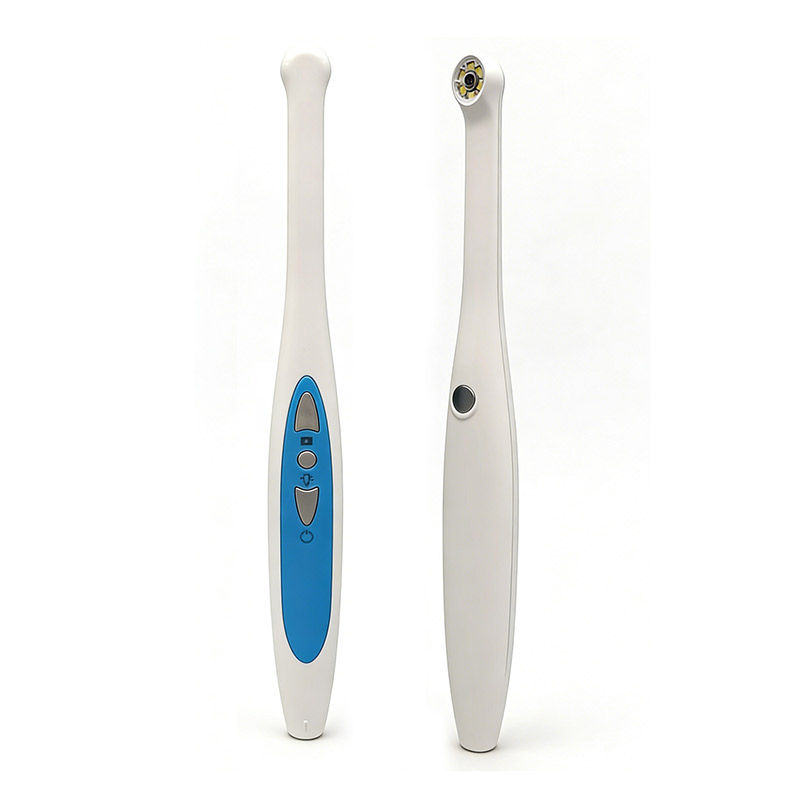
CDC and OSHA guidelines heavily mandate strict cross-contamination protocols. Dental equipment must reliably survive aggressive cold sterilization methods daily. Frequent wipe-downs using harsh chemicals happen after every single patient appointment. These sanitation cycles push hardware materials to their absolute physical limits.
Unsealed lenses create a severe, hidden degradation problem over time. They allow microscopic moisture and chemical residue to penetrate the outer housing. Over time, this slow fluid ingress leads to internal sensor corrosion. You will eventually notice permanent lens fogging and severely degraded diagnostic image quality. It ruins the tool from the inside out. Once moisture enters the optical array, you cannot reverse the damage.
The ideal solution requires advanced optical manufacturing techniques. A true Waterproof Sealed Lens prevents fluid ingress completely. It physically ensures the internal optic array remains pristine. Your diagnostic capability does not degrade after months of rigorous clinical sanitation cycles. The glass stays clear, and the sensor stays dry.
Let us look at actual implementation reality in the dental clinic. Staff members are far more likely to comply with rigorous cleaning protocols when they feel confident. If they do not fear breaking sensitive equipment, they clean it thoroughly.
Consider these common mistakes when managing lens sanitation:
Staff avoiding thorough wipe-downs because older cameras previously short-circuited from basic moisture exposure.
Using highly abrasive scrubbers directly on the optical glass, which creates permanent micro-scratches.
Failing to allow the chemical disinfectant to dry fully before the next clinical use.
Submerging devices that are only rated for surface wipe-downs, destroying the internal seals rapidly.
Clinical directors must evaluate specific critical dimensions during the procurement process. You want digital imaging devices built for real-world clinical abuse. You need hardware built to last through years of demanding daily operations.
First, thoroughly assess component durability. Check the locking mechanism of the detachable cord carefully. Manufacturers currently use magnetic, threaded, or friction-fit physical connections. You must ensure it absolutely does not disconnect during complex intraoral maneuvering. A secure lock prevents the camera feed from dropping mid-exam.
Next, verify the software agnosticism of the device. Ensure the USB Intraoral Camera utilizes standard UVC (USB Video Class) or TWAIN drivers natively. This allows it to integrate seamlessly with your existing imaging software. It should work perfectly with major platforms like Dexis, Eaglesoft, or OpenDental. You should never have to pay ridiculous proprietary bridge fees just to capture a simple clinical photo.
Finally, strongly demand image integrity. Verify the lens assembly actively features scratch-resistant optical glass. Cheap consumer plastics cloud over time and ruin your image clarity permanently.
Table Name: Evaluation Matrix for Modular Clinical Cameras
Evaluation Criterion | Fixed-Cord Systems | Modular USB Systems | Clinical Impact |
|---|---|---|---|
Cable Durability | High risk of internal wire fracture. | Easily swappable upon failure. | Determines whether a broken wire ruins a $1,000+ investment. |
Lens Sealing | Often unsealed, prone to fogging. | Requires verified waterproof glass. | Dictates resistance to harsh CaviWipes and cold sterilization. |
Software Integration | Often requires proprietary bridges. | Uses universal TWAIN/UVC drivers. | Reduces IT headaches and eliminates recurring software license fees. |
Maintenance Downtime | 3–5 days awaiting RMA repairs. | Under 30 seconds for a cable swap. | Directly impacts patient case acceptance and daily revenue generation. |
Staff adoption requires focused, practical training from leadership. You must actively train dental assistants on the proper insertion and removal of removable cords. Pulling the plug straight out effectively prevents premature wear on the camera's internal port. Wiggling it aggressively side-to-side causes severe long-term damage to the delicate internal connection pins.
You must watch out for the cheap consumer-grade trap. Many ultra-low-cost, non-medical grade cameras currently flood the dental market. They heavily market themselves as waterproof but fail basic clinical-grade chemical exposure tests. They often leak after just a few weeks of daily CaviWipes exposure. These cheap devices ultimately cost you more in constant replacements and frustrated staff.
Take decisive action now with these specific rollout lessons. We highly recommend following these exact steps to optimize your next hardware purchase:
Audit the practice's current graveyard of broken cameras thoroughly. Pull them out of the storage drawers and inspect them.
Determine the primary root cause of failure. Look closely for cord fractures versus internal lens moisture oxidation.
Structure your next procurement cycle strictly around these identified physical vulnerabilities.
Draft clear standard operating procedures for plugging and unplugging modular equipment safely in the operatory.
Train all new clinical hires on these specific handling protocols during their initial onboarding week.
The long-term viability of clinical imaging hardware is dictated entirely by its weakest physical links. In most dental practices, the connection cord and the lens housing always fail first. Understanding this reality fundamentally changes how we buy and manage equipment.
We offer a clear final recommendation. Prioritizing modularity and environmental sealing works exceptionally well. It completely eliminates preventable equipment loss and significantly stabilizes your practice's technology budget. You stop wasting money on brittle designs that cannot survive a busy clinical environment.
We strongly advise decision-makers to request specific warranty details. Ask your vendors directly about cable wear policies and fluid damage guarantees before finalizing your next hardware purchase. Protect your clinic from bad engineering by demanding truly modular, sealed equipment.
A: No, it does not. As long as the cable meets required data transfer specifications like USB 2.0 or 3.0, performance remains perfect. A secure connection port guarantees zero degradation in the live video feed or final image capture quality. You get the exact same high-resolution performance as a fixed-cord system.
A: A properly sealed, glass-optic medical device should easily last several years under normal chemical wipe-downs. You must ensure staff avoid using abrasive scrubbers directly on the glass surface. High-quality seals resist degradation from standard cold sterilization chemicals, keeping the internal optics pristine for thousands of exams.
A: Yes, it certainly can. Most modern modular cameras operate as plug-and-play devices via USB. They utilize universal TWAIN drivers to communicate flawlessly with major dental software platforms. You rarely need complex extra configurations or expensive third-party bridge modules to save images directly to patient charts.
A: While some manufacturers prefer proprietary locking pins to secure the connection, many modern brands use standardized formats. You will frequently see reinforced USB-C or micro-USB connections in newer models. We strongly recommend checking replacement part availability and replacement cost during your initial equipment evaluation phase.


